Omega3P command syntax
Block-by-block description of the .omega3p input file. Each block is shown as a complete example followed by the meaning of every key. Narrative explanations and worked cases are in the Omega3P module guide; the machine-generated list of every keyword the code reads, with defaults and source locations, is in the Omega3P keyword table.
Top-level blocks: ModelInfo, FiniteElement, PRegion, EigenSolver, Port, PostProcess.
ModelInfo
ModelInfo : {
  File: ./pillbox+recWG4.ncdf
  BoundaryCondition : {
    Magnetic:  1, 2
    Electric:  3, 4
    Exterior:  6
    Waveguide: 7
  }
  SurfaceMaterial : {
    ReferenceNumber: 6
    Sigma: 5.8e7
  }
  Material : {
    Attribute: 1
    Epsilon:   1.0
    Mu:        1.0
  }
}
File: mesh in NetCDF format, with an optional path. Default directory is where the job was submitted.
BoundaryCondition: maps boundary types to the sideset numbers assigned in Cubit. Every surface must belong to exactly one.
| Type | Meaning |
|---|---|
Electric |
Tangential E = 0. Perfect conductor or electric symmetry plane. |
Magnetic |
Tangential H = 0. Magnetic symmetry plane. |
Exterior |
Computationally identical to Electric, but marks a real metal wall so that wall loss and Q0 are computed by perturbation using the conductivity in SurfaceMaterial. |
Impedance |
Fields related by a surface impedance from the conductivity in SurfaceMaterial. For a lossy conductor when the skin depth is small compared with the element size. Requires FrequencyShift to be close to the mode frequency, since the impedance is evaluated there. |
Absorbing |
First-order absorbing boundary for waves at c. For coaxial ports and beam pipe truncation. See Port with CutoffFrequency. |
Waveguide |
Modal waveguide boundary. Pair with a Port block. |
Periodic_M, Periodic_S |
Master and slave surfaces of a periodic boundary. Their surface meshes must be identical. |
Theta |
Phase advance in degrees between master and slave. |
SurfaceMaterial: wall properties for loss calculation. ReferenceNumber is the sideset; Sigma the conductivity in S/m. Absent, the wall is copper at 5.8×10⁷ S/m. Repeat the block for surfaces of different materials.
Material: volume properties by Cubit block. Absent, the volume is vacuum.
| Key | Meaning |
|---|---|
Attribute |
Block ID |
Epsilon, Mu |
Relative permittivity and permeability |
EpsilonImag, MuImag |
Imaginary parts for material loss. Default 0. Negative for a passive lossy material. |
PML |
Sub-block making this block a perfectly matched layer, below |
PML
A perfectly matched layer terminates a domain by absorbing outgoing waves in an artificially lossy region. The conductivity ramps from zero at the inner face to a maximum at the outer face:

where \(d\) is the layer thickness, \(m\) the polynomial order, \(R\) the desired reflection coefficient, and \(\eta_0\) the free-space impedance. Give either Reflection Coefficient, from which the maximum is computed, or Maximum Sigma directly.
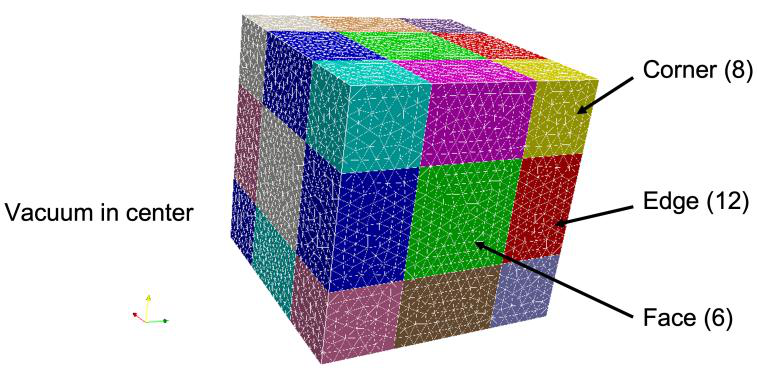
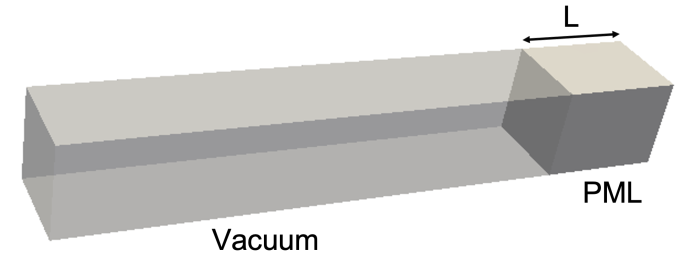
Free-space termination needs face, edge, and corner layers; a waveguide termination needs one face layer.
Material : {
  Attribute: 2
  PML: {
    Type: Face
    Start: -0.01143 -0.00508 0.08       // bounding box of the layer, m
    End:    0.01143  0.00508 0.10
    Direction: 0. 0. +1.                // outward normal
    Reflection Coefficient: 1.e-5
    Polynomial Order: 2
    Maximum Sigma: 2.e0 2.e0 2.e0       // alternative to Reflection Coefficient
  }
}
| Key | Meaning |
|---|---|
Type |
Face (6 orientations), Edge (12), or Corner (8) |
Start, End |
Bounding box of the layer in m |
Direction |
Orientation: one nonzero component for Face, two for Edge, three for Corner, each ±1 |
Reflection Coefficient |
Target reflection; sets Maximum Sigma |
Maximum Sigma |
Conductivity in x, y, z in S/m, if not derived from the reflection coefficient |
Polynomial Order |
\(m\) in the profile |
A spherical or cylindrical PML replaces the bounding box and direction with the layer geometry:
PML: {
  Type: Face
  SubType: Sphere            // or Cylinder
  BoundaryID: 6              // sideset of the outer surface
  Radius: 0.05
  Thickness: 0.004
  Reflection Coefficient: 1.e-5
  Polynomial Order: 2
}
FiniteElement
Order is the polynomial order of the basis functions, 1 to 6; 2 is adequate for most work. CurvedSurfaces (also accepted as Curved Surfaces) uses the mid-edge nodes of the quadratic mesh to represent curved boundaries; default on.
PRegion
Different orders in different blocks. Set the global order to 0 and give each block its own:
FiniteElement : { Order: 0  CurvedSurfaces: on }
PRegion : { Type: Material  Reference: 1  Order: 2 }
PRegion : { Type: Material  Reference: 2  Order: 3 }
Reference is the block ID. Every block must then appear in a PRegion.
EigenSolver
| Key | Default | Meaning |
|---|---|---|
NumEigenvalues |
1 | Modes to find, counting upward from FrequencyShift |
FrequencyShift |
10 GHz | Modes above this frequency are searched. Set just below the lowest mode of interest. |
Tolerance |
1e-8 | Relative eigenpair residual |
MaxIterations |
200 | Krylov iteration limit |
The default solver handles real (lossless) and complex (lossy or port-loaded) problems as linear or quadratic eigenproblems. A port-loaded problem stays quadratic only when every loaded port mode shares the same cutoff frequency. Otherwise use the nonlinear solver below.
Linear solver inside the eigensolver
The shift-invert operator inside each Arnoldi iteration can use PETSc instead of the default direct solver, which matters for problems too large for MUMPS:
EigenSolver : {
  NumEigenvalues: 1
  FrequencyShift: 1.0e9
  Arnoldi: {
    LinearSolver: {
      Solver: PETSc
      Preconditioner: MP         // p-order multilevel preconditioner
      SubCommSize: 8
      Tolerance: 1e-10
      MaxIterations: 8000
      PETScOption: {
        Runtime: -ksp_type cg -log_view -options_left -ksp_converged_reason
      }
    }
  }
}
| Key | Default | Meaning |
|---|---|---|
Solver |
MUMPS | PETSc to use a PETSc Krylov solver |
Preconditioner |
PETSc built-in | MP: ACE3P's multilevel preconditioner, which solves at order 1 to precondition order 2 |
SubCommSize |
8 | MPI sub-communicator size for MP |
Tolerance |
1e-16 | Relative convergence |
MaxIterations |
1000 | Krylov iteration cap |
PETScOption.Runtime |
PETSc command-line options; several Runtime lines allowed |
Use -ksp_type cg for lossless (Hermitian) problems and -ksp_type gmres for lossy (non-Hermitian) ones; CG diverges on the latter. Complex problems need the binaries built against complex PETSc, in the bin-petsc-complex directory of the installation. The same LinearSolver nesting applies inside ESIL, InvertMode, and the other eigensolver containers.
Nonlinear eigensolver (CORK)
EigenSolver : {
  NumEigenvalues: 3
  Tolerance:      1e-10
  FrequencyShift: 1.0e9
  SolverMode:     CORK
  CORK: {
    TargetFrequencyMin:  1.0e9
    TargetFrequencyMax:  2.4e9
    TargetFrequencyImag: 5.0e8
    MaxIterations:       500
    ApproxTolerance:     1e-12
    ApproxMaxDegree:     100
    OneRKSShift:         1
  }
}
| Key | Meaning |
|---|---|
TargetFrequencyMin, TargetFrequencyMax |
Real-frequency search window in Hz |
TargetFrequencyImag |
Largest imaginary part searched, Hz |
MaxIterations |
Nonlinear iteration cap |
ApproxTolerance |
Accuracy of the rational approximation |
ApproxMaxDegree |
Maximum polynomial degree of the approximation |
OneRKSShift |
Use a single rational Krylov shift. Read by CORK_RationalNewton.C; present in the CW23 example but not described in the command reference. |
Procedure: run once loading many modes per port, read the cutoffs in 2dports.log, count the propagating modes at each port for the modes of interest, and rerun loading only those. Tutorial 2 walks through it.
Port
One block per Waveguide surface. Absent, one mode is loaded. ReferenceNumber must match the sideset listed under Waveguide.
For an Absorbing surface, a Port block with CutoffFrequency improves the first-order boundary by giving it the guide's phase velocity at the eigenfrequency instead of c:
PostProcess
| Key | Default | Meaning |
|---|---|---|
Toggle |
on | Write .mod field files for ParaView |
ModeFile |
omega3p |
Prefix of the mode files |
WriteLoss |
off | Also write .loss files with the surface power density distribution. Read as PostProcess.WriteLoss in the shared post-processor emfem/src/NewPP.C. |
Post-processing of modes for R/Q, kick factors, and field extraction is done by acdtool postprocess rf; see the acdtool command syntax.