Tutorial 3: lossy load and periodic boundaries
Two further Omega3P features: a second material with complex permittivity, which absorbs power and produces a complex eigenvalue without any port, and periodic boundary conditions for one cell of a traveling-wave structure.
Part A: waveguide coupler with a lossy load
Example directory: examples/omega3p/pillbox+recWG+load

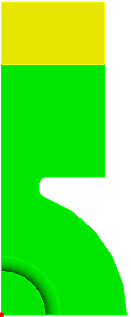
Instead of terminating the waveguide of Tutorial 2 with a port, fill its end with a lossy dielectric. The journal step3-ADD-load.jou webcuts the guide at y = 200 mm so the far section becomes a separate volume.
Imprint and merge
Two volumes that touch must share a single interface surface, otherwise the mesh is disconnected across it and the solver sees two separate cavities. Cubit does this with imprint and merge:
reset
import acis "pillbox+recWG+load.sat"
imprint body 1 2
merge body 1 2
volume all scheme Tetmesh
volume 1 sizing function type skeleton scale 7 time_accuracy_level 2 min_size auto max_size 15 max_gradient 1.2
volume 2 sizing function type skeleton scale 7 time_accuracy_level 2 min_size auto max_size 10 max_gradient 1.2
mesh volume all

Sideset 1 surface 4 20
Sideset 2 surface 9
Sideset 6 surface all except 4 20 9 1

block 1 volume 1          # vacuum
block 2 volume 2          # load
block all element type tetra10
volume all scale 0.001
export Genesis "pillbox+recWG+load.gen" block all overwrite
Each volume goes in its own block so the solver can assign different materials. The load gets a finer mesh since the wavelength inside a high-permittivity material is shorter.
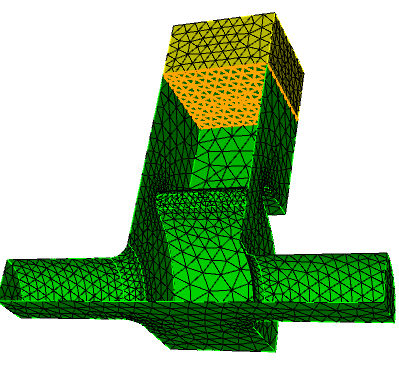
After imprint and merge, the interface between guide and load is one surface. Verify this in Cubit before export.
Input with two materials
ModelInfo : {
  File: ./pillbox+recWG+load.ncdf
  BoundaryCondition : {
    Magnetic:  1, 2
    Exterior:  6
  }
  Material : {
    Attribute: 1
    Epsilon:   1.0
    Mu:        1.0
  }
  Material : {
    Attribute: 2
    Epsilon:   10.0
    EpsilonImag: -1.52         // loss tangent 0.152
    Mu:        1.0
  }
  SurfaceMaterial : {
    ReferenceNumber: 6
    Sigma: 5.8e7
  }
}

FiniteElement: {
  Order:           1
  CurvedSurfaces: on
}

EigenSolver : {
  NumEigenvalues: 2
  FrequencyShift:  1.1e9
}
EpsilonImag is negative for a lossy material. There is no Waveguide boundary and no Port block; the loss comes entirely from the volume. The problem is still a complex eigenproblem.
Results
Eigenvalue: (591.2395988707802, 0.1200579050951992)
        Frequency: (1160172571.152617, 117793.09714004)
Eigenvalue: (600.8495902547749, 90.41431550096833)
        Frequency: (1172850486.101091, 87749817.12126675)
Mode 0 at 1.160 GHz has a small imaginary part, Q of about 4900 from the load, and is the cavity mode. Mode 1 at 1.173 GHz has an imaginary part of 88 MHz, Q below 10, and lives mostly in the load. Heavily damped modes like this appear whenever a lossy volume is present; recognize them by their very low Q and by inspecting the field in ParaView.
Part B: periodic boundaries for a disk-loaded structure
Example directory: examples/omega3p/dlwg-pbc
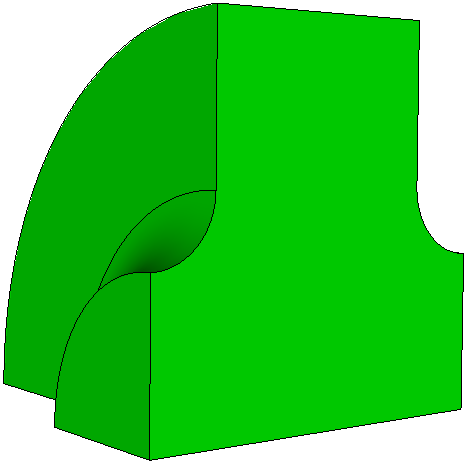
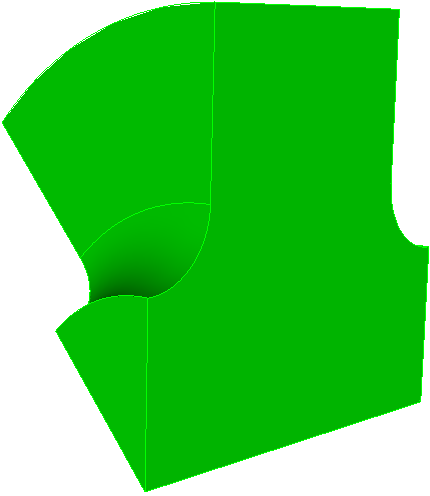
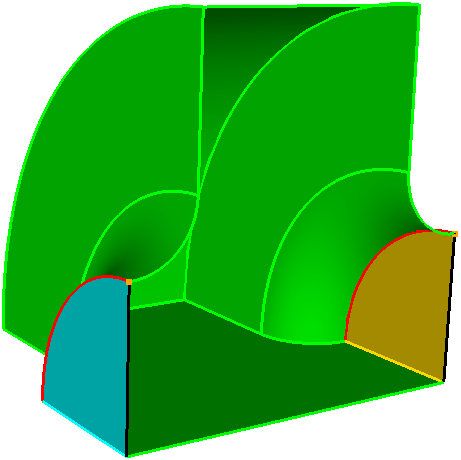
One cell of a disk-loaded waveguide as a quarter model and as an eighth model.
A traveling-wave accelerator structure is periodic. Rather than model many cells, simulate one with a periodic boundary condition: the field on the exit face equals the field on the entry face times a phase factor \(e^{-j\theta}\). Sweeping the phase advance \(\theta\) gives the dispersion curve.
Mesh the master and slave faces identically
The periodic condition maps each node on the master face to a node on the slave face, so the two surface meshes must be the same. Mesh the master surface first, copy its mesh to the slave with matching curve and vertex pairs, then mesh the volume.
reset
import acis "ds-cell-1fourth.sat"
volume 1 scheme tetmesh
volume 1 size 2.0
surface 5 6 size 1.          # nose cone
surface 9 size 1.            # iris

mesh surface 2               # master face
copy Mesh Surface 2 Onto Surface 4 source curve 10 target curve 17 source vertex 9 target vertex 10 Nosmoothing
mesh volume 1

sideset 3 surface 2          # Periodic_M
sideset 4 surface 4          # Periodic_S
sideset 1 surface 3
sideset 2 surface 1
sideset 6 surface all except 2 4 3 1

block 1 vol all
block 1 element type tetra10
transform mesh output scale 0.001
export genesis "pbc-4.gen" overwrite
Warning
Do not smooth the mesh after copying, and do not let a volume smoother move the periodic faces. The Nosmoothing option and the commented-out smooth lines in the example are deliberate.
Input with a phase advance
ModelInfo : {
  File: ./pbc-4.ncdf
  BoundaryCondition : {
    Exterior: 6
    Magnetic: 1, 2
    Periodic_M: 3              // master face
    Periodic_S: 4              // slave face
    Theta: -150                // phase advance per cell, degrees
  }
  SurfaceMaterial: {
    ReferenceNumber: 6
    Sigma: 5.8e7
  }
}

FiniteElement: {
  Order:           2
  CurvedSurfaces: on
}

EigenSolver : {
  NumEigenvalues: 1
  FrequencyShift:  1.10e9
}
Periodic_M and Periodic_S name the master and slave sidesets. Theta is the phase advance in degrees. The sign convention follows the direction from master to slave. For a \(2\pi/3\) structure, set Theta to 120 or -120 and compare the frequency against the design.
Dispersion curve
Run the same mesh with Theta at several values between 0 and 180 and plot frequency against phase advance. The 0 and 180 degree points are the band edges and can also be obtained with the ordinary magnetic and electric boundary conditions on the two faces; use that as a cross-check of the periodic implementation.
The example includes dlwg-pbc4-m1.omega3p, which switches one symmetry plane to Electric to pick the dipole band instead of the monopole band, and dlwg-pbc8-m0.omega3p for the eighth model.