T3P command syntax
Block-by-block description of the .t3p input file. Worked cases are in the T3P module guide.
Top-level blocks: ModelInfo, FiniteElement, PRegion, LoadingInfo, Loading, TimeStepping, Monitor, LinearSolver, CheckPoint.
ModelInfo
As in Omega3P with these differences.
Boundary types: Electric, Magnetic, Exterior, Absorbing, Waveguide (broadband, dispersive), Impedance.
Material gains time-domain options:
Material : {
  Attribute: 1
  Epsilon:   35.83
  Mu:        1.0
  Sigma:     0.316           // bulk conductivity, S/m, frequency independent
  Chi2:      ...             // second-order nonlinear susceptibility
  Chi3:      ...             // third-order nonlinear susceptibility
  Esat2:     1e10            // saturation field for the Chi2 term, V/m (default 1e10, i.e. none)
  Esat3:     1e10            // saturation field for the Chi3 term, V/m
  Omegam:    1.852832e+09    // time-varying material: modulation angular frequency, rad/s
  Epsm:      -10.0           // time-varying material: permittivity modulation amplitude
  Dispersion : {             // Lorentz model; only one dispersive material allowed
    Type:    Lorentz
    Omega_0: ...             // resonance angular frequency
    Omega_p: ...             // resonant strength
    Gamma:   ...             // decay rate
    Eps_inf: ...             // high-frequency permittivity
  }
}
The Lorentz permittivity is
New since CW23
Three material models were added after CW23:
- Nonlinear with saturation (2023 to 2024):
Chi2,Chi3withEsat2,Esat3. Solved either by re-linearizing every step (LinearSolver.PETScOption.BuildMatrix: on) or by PETSc SNES Newton (TimeStepping.PETScOption.Jacobian), see TimeStepping. - Time-varying permittivity (2025):
Omegam,Epsmswitch or modulate a material in time, for photonic switches and time-modulated structures. - Lorentz dispersion (2025): the
Dispersionblock above, implemented by recursive convolution and validated against CST.
SurfaceMaterial takes Frequency and an optional Coating as in S3P. The Impedance boundary with a SurfaceMaterial is also what the SurfacePowerLoss monitor reads.
PML is as in Omega3P, with Polynomial Order typically 3 in time domain.
FiniteElement and PRegion
Order and CurvedSurfaces as elsewhere. For the moving window, set the global order to 0 and define the window:
FiniteElement : { Order: 0  CurvedSurfaces: on }
PRegion : {
  Type:         AutomaticMovingWindow
  Order:        2
  Back:         0.001          // m behind the bunch
  Front:        0.002          // m ahead
  StructureEnd: 0.0689         // z where the window stops moving
}
The window spans Back plus the bunch length plus Front. When the bunch reaches the front of the window a new window is created and the system matrix is reassembled, so a very short window saves per-step cost but adds reassembly cost. The wake is valid only up to about Back behind the bunch.
LoadingInfo
Beam excitation by a rigid bunch moving at c along z.
LoadingInfo : {
  Bunch : {
    Type:             Gaussian
    Sigma:            0.01            // m
    Number of sigmas: 5
    Charge:           1e-12           // C
  }
  SymmetryFactor:  4.0
  StartPoint:      0 0 -0.10
  Direction:       0 0 1
  BoundaryID:      3
  StartTime:       1.e-9              // optional, s
  NumBunches:      2                  // optional, bunch train
  BunchSeparation: 0.1                // optional, m
}
Bunch shapes:
Type |
Keys |
|---|---|
Gaussian |
Sigma, Number of sigmas (or Nsigmas). Total length 2 × Sigma × Number of sigmas. |
BiGaussian |
Sigma1 (front), Sigma2 (back), Number of sigmas. Asymmetric. |
Flattop |
Rise sigma, Number of rise sigma, Drop sigma, Number of drop sigma, Flattop width. Half-Gaussian edges on a flat top. |
| Key | Meaning |
|---|---|
SymmetryFactor |
2 if the beam lies on one magnetic symmetry plane, 4 at the corner of two. Scales the effective charge in the domain. |
StartPoint, Direction |
Entry point and direction; only z is allowed |
BoundaryID |
Surface the beam enters through; make it Absorbing |
StartTime |
Injection time of this bunch, default 0 |
NumBunches, BunchSeparation |
A train of identical bunches spaced in m |
Several LoadingInfo blocks give several independent bunches, used for dipole excitation with opposite charges.
Loading
Dipole, port, and surface excitation.
Loading : {
  Type: PortModeLoading
  Port : {
    ReferenceNumber: 3
    SymmetricFactor: 4               // 1 none, 2 one plane, 4 two planes
    NumberOfModes:   1
  }
  Excitation : { Power: 1.  Pulse : { ... } }
}
The port surface is Absorbing in ModelInfo so outgoing waves leave. Port modes are solved numerically, or imported from files:
Port : {
  ReferenceNumber: 3
  Origin:     0.0 0.0 -1.928
  XDirection: 1.0 0.0 0.0
  YDirection: 0.0 1.0 0.0
  ESolver : {
    Type: Interpolative
    Mode : { ExFile: Ex.prn  EyFile: Ey.prn  BxFile: Bx.prn  ByFile: By.prn }
  }
}
Each file is a table of ix iy x y F on an M×N grid, rows advancing ix fastest, E in V/m and B in T.
Pulse
Type |
Keys |
|---|---|
Gaussian |
Frequency (carrier, Hz), Bandwidth (Hz), DB (truncation below peak), T0 (delay in sigmas), Phase (degrees) |
Monochromatic |
Frequency, Rise periods (cycles to full amplitude), Fall periods (optional), T0 (start time, s), TMax (total duration, s, optional) |
UserDefinedPulse |
T0 (time offset, s), Scaling, Frequency (for port-mode evaluation, Hz), File: two-column text, time and amplitude |
Note that SymmetricFactor inside Loading.Port is spelled differently from SymmetryFactor in LoadingInfo. Both are as the code reads them.
TimeStepping
Both in seconds. The implicit scheme is unconditionally stable, so DT is set by the frequency content to be resolved.
New since CW23
For nonlinear materials (Chi2, Chi3, Epsm) the time step can be solved with PETSc's nonlinear solver SNES, or by re-linearizing the system every step:
TimeStepping : {
  MaximumTime: 8e-9
  DT:          6e-13
  PETScOption : {
    Jacobian: fd_jacobian_coloring   // analytic (default), fd_jacobian, fd_jacobian_coloring, Picard
  }
}
LinearSolver : {
  Solver: PETSc
  PETScOption : { BuildMatrix: on }  // alternative: rebuild the linearized matrix every step
}
fd_jacobian_coloring is the practical default for SNES. Picard runs a fixed-point iteration instead of Newton.
Monitor
Type |
Keys | Output |
|---|---|---|
Point |
Name, Coordinate |
<Name>.out: t, Hx Hy Hz, Ex Ey Ez in SI |
Volume |
Name, TimeStart, TimeEnd, TimeStep |
<Name>ts_t<time>ps.out.mod snapshots for ParaView |
WakeField |
Name, StartContour, EndContour, Smax, optional Grid |
<Name>.out: s, W(s) in V/C, I(s) in A/m, with loss or kick factor in the header |
Power |
Name, ReferenceNumber, optional TimeStart, TimeEnd, TimeStep |
<Name>.out: t, power through the surface in W |
SurfacePowerLoss |
Name, ReferenceNumber |
<Name>.out: t, ohmic loss on the surface in W. Needs a SurfaceMaterial on that surface. |
ModeVoltage |
Name, Port with ReferenceNumber and ESolver (Type: Numerical2D, NumberOfModes, Frequency, Tolerance, MaxIterations) |
<Name>.out: t, modal voltage in V |
EmittedCurrent (new 2026, Pic3P) |
Name, ReferenceNumber of the emitting surface |
<Name>.out: t, I in A, cumulative charge in C; all emission models |
AbsorbedParticle (new 2026, Pic3P) |
Name, ReferenceNumber, optional DumpSteps (default 1000) |
OUTPUT/<Name>.ncdf: x y z, px py pz, interpolated arrival t, charge of every particle leaving through that surface |
DriveFieldPoint (new 2026, Pic3P) |
Name, Coordinate |
<Name>.out: the applied drive field at the point vs t (the Point monitor sees only the scattered field) |
New since CW23
EmittedCurrent, AbsorbedParticle and DriveFieldPoint are particle monitors added in 2026 for Pic3P runs; their syntax is shown on the Pic3P page. acdtool postprocess wake_direct (2025) evaluates the direct-integration wake at other transverse positions after the run.
WakeField details
StartContour and EndContour bound the integration in z and default to the model ends. Smax is the wake length recorded and is limited by causality: with model length L and downstream pipe length l, the maximum is c × MaximumTime − (L − l).
The default is indirect (Weiland) integration along the beam-pipe boundary, valid when only vacuum is visible from pipe end to pipe end. The wake is computed at the beam's transverse position; for other positions use acdtool postprocess wake_new, and for transverse wakes acdtool postprocess transwake.
For collimator-like structures with intrusions, use direct integration along a circle inside the vacuum:
Monitor : {
  Type: WakeField
  Name: wakefield
  StartContour: 0.
  EndContour:   0.6
  Smax:         0.10
  Grid : {
    Method:     Circle
    Radius:     0.0149       // m
    NPoints:    10
    StartDense: 0            // degrees
    EndDense:   90
    Fraction:   1
  }
}
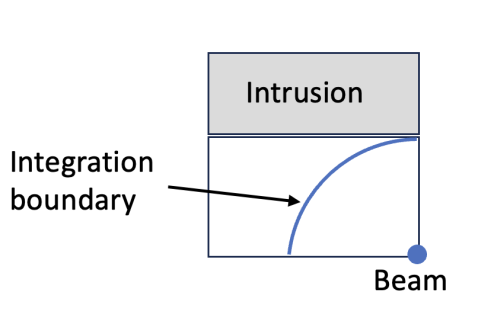
A long downstream catch-up distance is needed for convergence. acdtool postprocess wake_direct evaluates it at other positions.
LinearSolver
MUMPS, direct, for small problems. CG with CHOLESKY or DIAGONAL for large ones. A missing or misspelled Solver key gives the compiled-in default, MUMPS on the SLAC and NERSC builds.
MUMPS
New since CW23
Optional top-level MUMPS block, read by every module that factorizes with MUMPS (Omega3P, S3P, T3P, Pic3P, TEM3P, Gun3P). Since v2026.11 a factorization that runs out of workspace (MUMPS error -9) is retried automatically with a doubled memory margin, 45 to 90 to 180 to 200 percent, instead of aborting. The block tunes that behaviour; without it only the retry is active.
MUMPS : {
  MemoryRelaxation:    90      // starting margin, percent (default 45)
  MaxMemoryRelaxation: 200     // stop retrying above this (default 200)
  MemoryPerRank:       14000   // optional cap on workspace per rank, MB
  ICNTL_35: 1                  // any raw MUMPS ICNTL(k), applied last
}
If a log shows a retry line, set MemoryRelaxation to the value that succeeded to skip the wasted first attempt. Results do not depend on the margin.
CheckPoint
CheckPoint : {
  Action:     restart        // none or restart; restart is default
  Ntimesteps: 700            // interval, default 1000
}
Resubmitting a run with restart continues from the last checkpoint. To extend a finished run, raise MaximumTime and resubmit.