Facilities
A single Squirrel can serve several facilities. The facility you choose scopes what you see and what new snapshots capture.
The Facility Hierarchy
Facilities form a tree. For example, LCLS contains LCLS-SC and LCLS-NC. Choosing a facility always includes everything below it:
| You choose | You see |
|---|---|
| All facilities | Every PV and snapshot |
| LCLS | LCLS, LCLS-SC, and LCLS-NC |
| LCLS-SC | LCLS-SC only |
Choosing a Facility
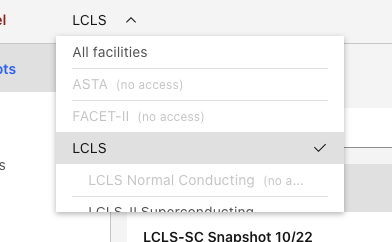
Use the facility picker in the header, next to the Squirrel name. Facilities below another facility are indented under it. Choosing one keeps you on the page you're viewing, except on a snapshot's details or compare page, where it takes you to the new facility's snapshot list instead.
Facilities in the Page Address
The facility appears at the start of the page address, after the Squirrel URL:
| Address | Shows |
|---|---|
/snapshots |
Snapshots for every facility |
/lcls/snapshots |
Snapshots for LCLS, LCLS-SC, and LCLS-NC |
/lcls-sc/snapshots |
Snapshots for LCLS-SC |
Because the facility is in the address, you can bookmark a facility's view or send the link to a colleague, and they'll see the same scope.
If the address names a facility that doesn't exist, Squirrel shows a Not found page. This
also happens for a mistyped page name such as /snapshotz, since Squirrel reads it as a facility.
What the Facility Affects
- Snapshot list - Shows snapshots taken in the chosen facility, or below it
- Taking a snapshot - Captures only the chosen facility's PVs. With All facilities, it captures every PV.
- PV Browser - Shows the chosen facility's PVs, and new PVs start out assigned to it
- Compare dialog - Lists snapshots from the chosen facility
Tags, devices, and meta PVs are shared by every facility.
Snapshots without a facility: a snapshot taken with All facilities chosen doesn't belong to any facility. It appears only under All facilities, but its link still opens from anywhere.
Access to Facilities
Your API key may only have access to some facilities. In the picker, and in a PV's Facilities field, facilities your key can't reach are disabled and marked (no access). A facility stays selectable if your key can reach anything below it: with access to only LCLS-SC, you can still choose LCLS, and you'll see the LCLS-SC data.
If you open a facility your key can't reach (for example, from a link), the picker shows (no access) next to its name and lists come up empty. Saving a snapshot or editing a PV there shows an error naming the facility your key lacks. A CSV import with rows your key can't write is blocked before it's sent; see Importing from CSV.
If the facility list can't be loaded (for example, your API key doesn't have access to it), the picker shows Facilities unavailable but stays usable: choose All facilities from it, or type a facility into the page address.